
Taking photos at night is a challenge. You're trying to capture a beautiful city skyline or a memorable moment with friends, but the low light forces a slow shutter speed. The result is often a blurry, shaky mess. While smartphone cameras have improved, motion blur and digital noise can still ruin a great shot. The question is, what’s the best way to fix it?
Many people turn to all-in-one design platforms, while others seek out specialized tools. This brings us to a common matchup: a dedicated AI tool versus a creative suite. We’ll compare UnblurImage, an AI tool designed for one job, against Adobe Express, a platform with a wide range of creative features. For fixing those tricky, shaky night photos, which one truly delivers?
UnblurImage: The Specialist Tool
UnblurImage is an AI-powered tool created with a single, clear purpose: to fix blurry and out-of-focus photos. It uses advanced algorithms to analyze and correct motion blur, camera shake, and focus issues. Instead of offering a hundred different features, it concentrates all its power on rescuing images that would otherwise be unusable. This focused approach makes it a compelling solution for a very common problem.
The platform is built for speed and efficiency. You upload your photo, and the AI handles the complex work of sharpening details and reducing noise. It’s a perfect example of a tool that does one thing exceptionally well. For anyone frustrated with unclear images, the ability to use an Unblur Image tool that gets straight to the point is a huge advantage. The technology is also expanding into other areas, with a powerful Video Enhancer available for improving shaky footage.
Key Features
UnblurImage’s feature set is lean and powerful, centered entirely on image correction.
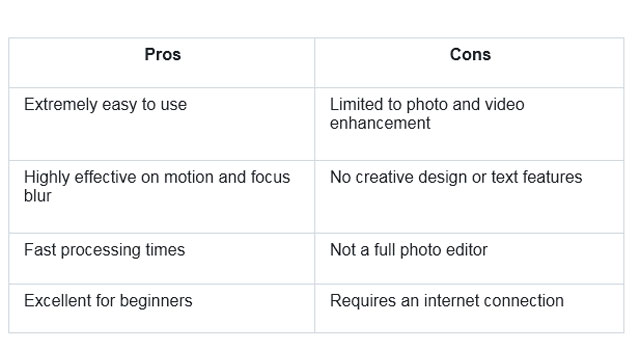
* AI-Powered Deblurring: The core of the tool is its sophisticated algorithm that intelligently identifies and reverses blur from camera shake or subject movement. It reconstructs details without creating artificial-looking edges.
* Noise Reduction: Low-light photos are often plagued by digital noise or grain. UnblurImage automatically cleans this up, resulting in a smoother and clearer final image.
* Simple User Interface: The entire process is streamlined into a simple upload-and-process workflow. There are no complicated menus, layers, or settings to navigate.
* Batch Processing: For users with multiple blurry photos, the tool allows you to upload and fix several images at once, saving significant time.
Pros & Cons
Best For
UnblurImage is ideal for photographers of all skill levels, from hobbyists to professionals, who need a quick and reliable way to fix blurry photos. It’s also perfect for anyone who wants to rescue cherished memories from old, slightly out-of-focus digital pictures without learning complex software.
Adobe Express: The Creative Suite
Adobe Express is an all-in-one design application that combines features from various Adobe products into a single, user-friendly platform. It's designed for content creators, marketers, and small business owners who need to quickly create social media graphics, flyers, videos, and other marketing materials. Photo editing is just one component of its vast toolkit.
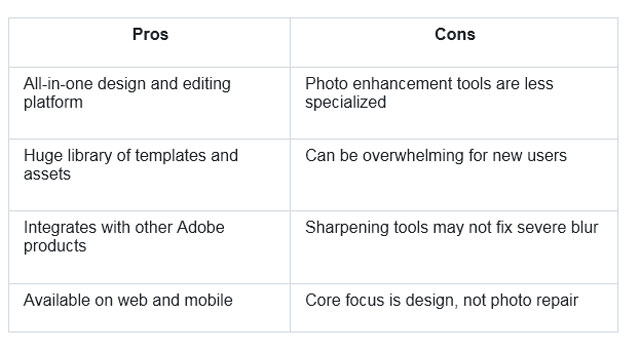
Within Adobe Express, you can find tools for sharpening images, adjusting brightness and contrast, and applying filters. The platform leverages Adobe's powerful imaging technology, but its primary goal is to facilitate content creation, not just photo restoration. This means its deblurring features are part of a much larger ecosystem, competing for attention with template libraries, font collections, and animation tools.
Key Features
Adobe Express offers a wide array of features that go far beyond simple photo correction.
* Integrated Photo Editor: Includes basic to intermediate editing tools like cropping, filters, and adjustments for exposure, contrast, and sharpness.
* Template Library: Provides thousands of professionally designed templates for social media posts, stories, logos, and more.
* Design and Text Tools: Users can add text, graphics, and brand elements to their projects.
* Cross-Platform Syncing: Projects are saved to the cloud, making them accessible across web and mobile devices.
Pros & Cons
Best For
Adobe Express is best suited for social media managers, marketers, and small business owners who need a versatile tool to create a wide variety of visual content. It’s a great choice for users whose needs extend beyond photo correction to include graphic design, video creation, and branding.
Side-by-Side Comparison Summary
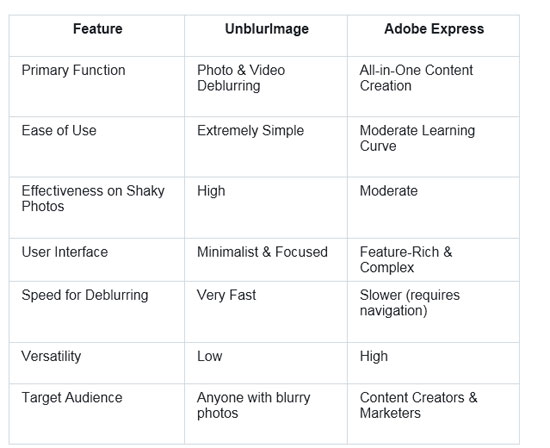
When you put these two tools head-to-head, their different philosophies become clear. UnblurImage is a precision instrument, while Adobe Express is a multipurpose toolkit.
Final Recommendation
So, which tool should you choose for fixing your shaky night photos? The answer depends entirely on your primary goal.
If your main objective is to rescue a blurry, out-of-focus, or noisy photograph and achieve the best possible clarity, UnblurImage is the clear winner. Its specialized AI is purpose-built for this task. The tool analyzes motion and focus issues with a depth that a general-purpose editor can’t match. The simplicity of the process, upload, process, download, means you get superior results in a fraction of the time. You don't have to hunt through menus or experiment with multiple sliders. For the specific problem of a shaky night photo, a specialist tool simply performs better.
On the other hand, if your blurry photo is just one element in a larger design project, like a social media post or a promotional flyer, then Adobe Express is a more practical choice. Its strength lies in its versatility. You can sharpen the image, add text, apply a branded overlay, and export it in the correct dimensions all within one platform. While its sharpening tool may not be as powerful as UnblurImage's AI, it is often good enough for general use, especially when the image is part of a broader design.
Ultimately, for photographers and individuals focused purely on image quality and restoration, the dedicated, powerful, and easy-to-use nature of UnblurImage makes it the superior option. For content creators juggling multiple design tasks, the convenience of Adobe Express's integrated suite is hard to beat.