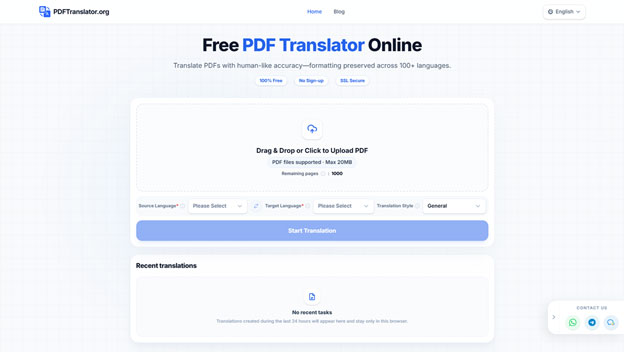
Academic work increasingly crosses language boundaries. A useful research paper may be published in German, a technical report may only be available in English, or a course instructor may assign reading material written in another language. In these situations, tools like PDFTranslator can help students and researchers quickly understand foreign-language materials without breaking the document structure. In these situations, a free PDF translator such as PDFTranslator can help.
Understanding the text is only part of the challenge. When using a free PDF translator, academic PDFs often contain tables, figures, footnotes, citations, equations, headings, and multi-column layouts. When the text is copied into a separate translation window, much of that structure can disappear. Paragraphs become difficult to match with the original, table cells move out of order, and image captions become separated from the figures they describe.
A more careful workflow—especially when using a PDFTranslator-style tool designed for layout preservation—can make translated academic documents easier to read, review, and cite.
Why Layout Preservation Matters in Academic Translation
Document structure carries meaning, not just formatting.
In research papers, headings show how arguments develop, while tables allow direct comparison of data. Captions explain figures, and footnotes often contain critical limitations or clarifications that change interpretation.
How Layout Affects Understanding
- Headings guide logical reading flow
- Tables preserve structured comparisons
- Captions link explanations to visuals
- Footnotes add essential context
When using tools like PDFTranslator, preserving this structure ensures that translated content still reflects the logic of the original document.
Why It Matters for Collaboration
Layout consistency is especially important in academic collaboration. A student and supervisor referencing the same table or section need to see identical structure. If a translated document preserves page alignment, discussion becomes faster and more accurate.
Preparing a PDF Before Translation
A few minutes of preparation can significantly improve translation quality.
Step 1 — Check Text Accessibility
First, confirm whether the PDF contains selectable text. If sentences can be highlighted, the file is text-based. If not, OCR may be required before using any tool, including PDFTranslator.
Step 2 — Inspect File Quality
Check for:
- Rotated or blurred pages
- Cropped content
- Password protection
- Large or unusual file size
These issues can affect translation accuracy.
Step 3 — Decide What to Translate
Not every page is necessary. For example:
- Focus on key chapters in long reports
- Skip irrelevant appendices
- Extract only required sections
This reduces processing time and improves clarity.
Using PDFTranslator to Preserve Structure During Translation
A document-level workflow is more effective than copying text manually.
Instead of translating paragraph by paragraph, PDFTranslator processes the entire file while maintaining layout elements such as headings, tables, images, fonts, and page structure. This makes it especially useful for academic PDFs where structure is part of the meaning.
Key Advantages of PDFTranslator
- Preserves original layout and formatting
- Supports 100+ languages
- Works without account registration
- Includes monthly free-page allowance
Practical Use Cases
Students and researchers often use PDFTranslator for:
- Literature review screening
- Translating journal articles
- Understanding technical reports
- Reviewing multilingual course materials
A second pass with PDFTranslator can also help when initial machine translations lose structure or readability.
Reviewing Translated Academic Content Efficiently
A full document does not need to be checked line by line in order.
Priority Sections to Review First
Start with:
- Abstract
- Research objective
- Methodology
- Key findings
- Conclusion
If these sections are clear, the document is likely useful.
Why This Approach Works
This method helps researchers quickly decide whether a paper is worth deeper analysis, especially when working with multiple sources in different languages.
Ensuring Terminology Consistency
Specialised vocabulary is one of the most error-prone areas in translation.
A term may differ across disciplines or even within the same field depending on context. For example, a word used in engineering may not carry the same meaning in economics.
Building a Terminology List
While reviewing a translated file (including those processed with PDFTranslator), record:
- Original term
- Translated term
- Definition or context
- Keywords section
- Introduction definitions
- Tables and figures
- Academic glossaries
- Previous publications
Where to Verify Terms
Consistency is more important than stylistic variation in academic work.
Checking Tables, Figures, and Equations Carefully
Visual elements often contain the most critical data.
Tables
Check:
- Row/column alignment
- Units and percentages
- Decimal accuracy
Figures
Verify:
- Axis labels
- Legends
- Captions
Equations
Ensure:
- Symbols match original meaning
- Variables are consistent
- Units are correctly preserved
Even when using PDFTranslator, these elements should always be manually reviewed.
Preserving Citations and Academic References
Translation does not change source integrity.
Author names, journal titles, DOIs, and URLs should remain unchanged. Citations should always be verified against the original document before use.
If page numbers shift after translation, use:
- Section headings
- Figure numbers
- Table identifiers
This ensures accurate referencing in academic writing.
Privacy Considerations Before Uploading PDFs
Not all academic documents are safe to upload without review.
Sensitive materials may include:
- Unpublished research
- Student records
- Internal reports
- Interview transcripts
Before using tools like PDFTranslator, check:
- Privacy policy
- Data retention rules
- File deletion practices
When necessary, create a redacted version containing only required pages.
Building a Repeatable Academic Translation Workflow
A structured process improves efficiency over time.
Recommended Workflow
- Check file readability
- Remove unnecessary pages
- Translate using a layout-preserving tool like PDFTranslator
- Compare with original
- Review key sections
- Verify terminology and data
- Save glossary terms
- Archive final versions clearly
File Naming Best Practice
Include:
- Author
- Year
- Language
- Review status
This prevents confusion between draft and verified translations.
Translation Improves Access, but Review Ensures Accuracy
Tools like PDFTranslator make academic content more accessible across languages while preserving structure that is often lost in basic translation workflows.
However, translation is only the first step. Students and researchers must still verify terminology, data, citations, and conclusions against the original document.
When used correctly, PDFTranslator helps maintain both readability and structure, making it easier to understand complex academic PDFs while keeping the original layout intact.