Creating stunning, high-resolution artwork is the goal of every digital artist and designer. But what happens when your final render is too small or lacks the crisp detail needed for large prints or 4K displays? This is where AI image upscalers come in, transforming low-resolution images into sharp, detailed masterpieces. Two popular names in this space are ImgUpscaler and Magnific AI, but they serve very different needs and budgets.
Choosing the right tool can be confusing. One promises straightforward, affordable upscaling, while the other offers powerful creative controls at a premium price. This guide breaks down the differences between ImgUpscaler and Magnific AI, helping you decide which tool is the perfect fit for your artistic workflow and wallet. We'll compare their features, performance, and ideal use cases to give you a clear winner for your specific needs.
ImgUpscaler: The Efficient and Accessible Enhancer
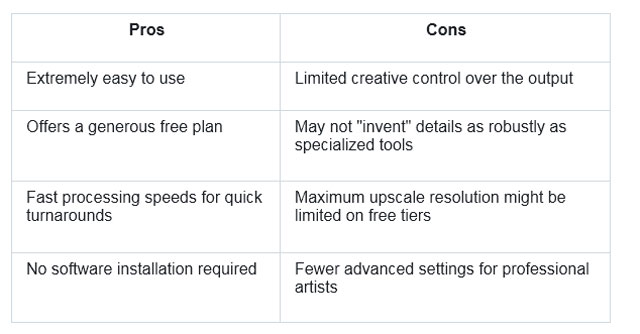
ImgUpscaler is designed for simplicity and efficiency. It focuses on one primary goal: to increase the resolution of your images quickly and cleanly without introducing unwanted artifacts. This makes it an incredibly practical tool for a wide range of users who need a reliable upscaling solution without a steep learning curve or a hefty price tag. The platform uses advanced AI algorithms to intelligently add pixels and enhance details, ensuring that the final output looks natural and sharp.
It's a web-based tool, meaning you don't need to download any software. You simply upload your image, select your desired settings, and let the AI do the work. Whether you're working with digital art, photographs, or e-commerce product images, ImgUpscaler provides a dependable way to improve quality. The core strength of the platform lies in its powerful Image Upscaler, which can breathe new life into older or smaller images with just a few clicks. It's built for users who value speed and ease of use above all else.
Beyond simple upscaling, the platform also functions as a versatile AI Photo Editor, offering tools to refine your images further. This accessibility makes it a go-to choice for creators who need to prepare visuals for social media, portfolios, or online stores without getting bogged down in complex software. The focus is on delivering a high-quality result with minimal effort from the user.
Key Features
* High-Resolution Upscaling: Increases image resolution by 2x, 4x, or even 8x, transforming standard images into 4K quality.
* AI-Powered Detail Enhancement: The algorithms are trained to recognize and sharpen important details like textures, edges, and fine lines for a crisp result.
* Batch Processing: Users can upload and process multiple images at once, which is a massive time-saver for large projects.
* User-Friendly Interface: The entire process is handled through a simple drag-and-drop interface that requires no technical expertise.
* Support for Various Formats: Works seamlessly with common image formats like JPG, PNG, and WEBP.
Pros & Cons
Best For
ImgUpscaler is the ideal choice for hobbyists, social media managers, bloggers, and small business owners who need a fast, affordable, and reliable way to enhance their images. It's perfect for preparing product photos for an e-commerce site, upscaling user-generated content for marketing campaigns, or simply improving the quality of personal photos and digital art projects without a significant investment in time or money.
Magnific AI: The Creative and Artistic Powerhouse
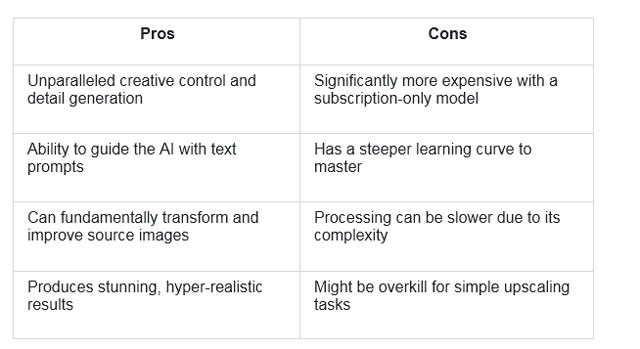
Magnific AI operates on a completely different philosophy. It isn't just an upscaler, it's a creative re-imagining tool. Designed for professional artists, photographers, and designers, Magnific AI uses generative AI to not only increase resolution but also to add an incredible amount of new, intricate detail. You can guide the process with text prompts, giving you significant control over the final look and feel of the image.
This tool is famous for its "Creativity" slider, which allows you to determine how much the AI should "hallucinate" or invent new details. At low settings, it functions as a high-fidelity upscaler. At high settings, it can transform a simple image into a hyper-detailed, fantastical piece of art. This makes it a powerful tool for concept art, fantasy illustrations, and photorealistic enhancements where adding more texture and depth is the primary goal.
The trade-off for this power is a higher cost and a more involved workflow. Users need to experiment with prompts and settings to achieve their desired outcome, making it less suitable for those who just need a quick resolution boost. It's a premium tool for creators who see AI as a collaborative partner in the artistic process.
Key Features
* Creative Upscaling Engine: Adds new, coherent details to an image based on its context and user prompts.
* Text Prompt Guidance: Allows you to describe the desired style, textures, and details you want the AI to generate.
* Creativity Slider: A unique feature that controls the level of AI "hallucination," from subtle enhancement to complete artistic transformation.
* Multiple Enhancement Modes: Offers settings optimized for different types of source material, such as portraits, landscapes, or illustrations.
* High-Detail Generation: Excels at creating photorealistic textures like skin, fabric, and environmental details.
Pros & Cons
Best For
Magnific AI is built for professional digital artists, concept designers, game developers, and photographers who want to push the boundaries of their work. It's the perfect tool for creating jaw-dropping fantasy art, developing detailed character concepts, or adding a layer of impossible detail to architectural renders. Anyone whose work benefits from generative detail and who has the budget for a specialized, premium tool will find immense value here.
Side-by-Side Comparison Summary
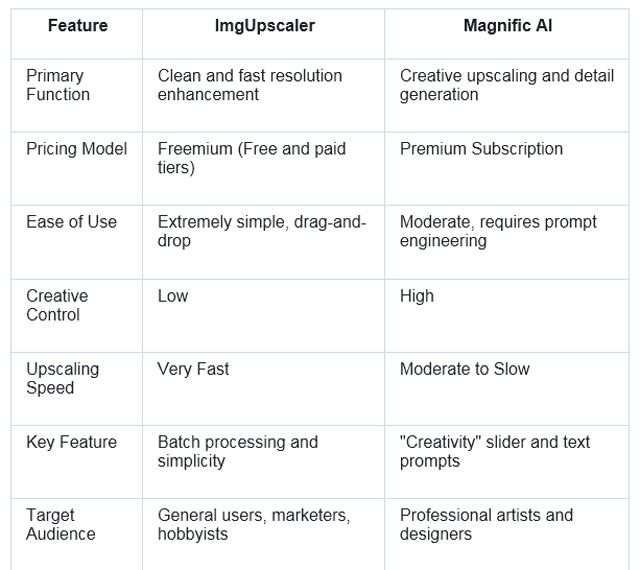
To make the choice clearer, here’s a direct comparison of ImgUpscaler and Magnific AI across several key factors.
Final Recommendation
So, which tool should you choose? The answer depends entirely on your goals and your budget.
Choose ImgUpscaler if:
You need a fast, reliable, and affordable tool to increase the resolution of your images. Your main goal is to make your pictures sharper and larger for online use or small prints. You value simplicity and efficiency and don't want to spend time learning complex software or writing prompts. For straightforward enhancement without the high cost, ImgUpscaler is the clear winner.
Choose Magnific AI if:
You are a professional artist or designer looking for a creative partner. Your goal is not just to upscale but to transform your work by adding new, stunning details. You are comfortable experimenting with settings and text prompts to achieve a specific artistic vision and have the budget for a premium, specialized tool. For projects that demand hyper-realism or fantastical detail, Magnific AI is in a class of its own.
Ultimately, both tools are excellent at what they do. ImgUpscaler democratizes high-quality upscaling, making it accessible to everyone. Magnific AI pushes the creative envelope, offering a glimpse into the future of generative art. By understanding their core strengths, you can confidently select the right tool to elevate your work to the next level.